Showing posts with label Wi-Fi. Show all posts

Improving Wi-Fi performance on smartphones and tablets


Boost Your Wi-Fi: Supercharge Performance on Smartphones And Tablets!

Improving Wi-Fi performance on smartphones and tablets


In today's connected world, smartphones and tablets have become an essential part of our daily lives. From browsing the internet to streaming videos and playing online games, we rely heavily on Wi-Fi networks to stay connected and get things done. However, often we encounter frustrating issues such as slow internet speed or weak signal strength. In this blog post, we will explore some tips and techniques to improve Wi-Fi performance on smartphones and tablets.


1. Find the Optimal Location

The placement of your Wi-Fi router plays a significant role in determining the signal strength and performance of your wireless network. Ensure that the router is placed in a central location within your home or office, away from obstructions such as walls and furniture. Also, keep it at an elevated position to minimize interference and maximize coverage.

2. Reduce Interference

Interference from other electronic devices can degrade your Wi-Fi signal. To minimize interference, keep your router away from appliances like microwaves, cordless phones, and baby monitors. Additionally, consider using a dual-band router that operates on both 2.4 GHz and 5 GHz frequencies, as it can help reduce congestion and interference.

3. Update Firmware

Routers often receive firmware updates from manufacturers to improve performance and address security vulnerabilities. Check your router's manufacturer website regularly for firmware updates, and install them to keep your device running efficiently. Updating firmware can help resolve compatibility issues and ensure the best Wi-Fi performance.

4. Secure Your Network

A secure wireless network not only prevents unauthorized access but can also enhance Wi-Fi performance. Set a strong password for your network to prevent outsiders from using your bandwidth. Consider using WPA2 encryption, the most secure option available for Wi-Fi networks, to protect your data and maintain optimal performance.


5. Use Quality Wi-Fi Equipment

Investing in quality Wi-Fi equipment can significantly improve wireless performance. Consider upgrading your router to a modern, high-speed model that supports the latest Wi-Fi standards. Additionally, ensure that your smartphones and tablets are equipped with the latest Wi-Fi technology to take full advantage of the network's capabilities.


6. Optimize Network Settings

Adjusting certain network settings can help optimize Wi-Fi performance on your smartphones and tablets. For example, enable Quality of Service (QoS) on your router to prioritize specific devices or applications that require higher bandwidth, such as video streaming or online gaming. This will ensure a smoother experience on your mobile devices.

7. Manage Background Apps

Background apps that constantly use the internet can affect Wi-Fi performance. Close or disable unnecessary apps running in the background to free up bandwidth for important tasks. You can also utilize the app settings on your smartphones and tablets to prevent applications from automatically updating or syncing when connected to Wi-Fi.

8. Consider Wi-Fi Extenders

If certain areas of your home or office experience weak Wi-Fi signals, consider using Wi-Fi extenders or repeaters to extend coverage. These devices amplify and rebroadcast the wireless signal, providing a stronger connection in areas that were previously out of range.

9. Perform Regular Router Maintenance

Performing regular maintenance on your router can help improve Wi-Fi performance in the long run. Restart your router periodically to clear its memory and improve stability. Additionally, keeping your router's antennae clean and free from obstructions can help optimize signal strength.

10. Conduct a Wi-Fi Site Survey

For more advanced users, conducting a Wi-Fi site survey can provide valuable insights into signal strength, interference, and coverage areas. There are various tools available, both online and as mobile apps, that can assist in analyzing your wireless network and making necessary adjustments to enhance performance.

So by following these tips and techniques, you can improve Wi-Fi performance on your smartphones and tablets significantly. A reliable and high-performing wireless network will ensure seamless internet browsing, fast downloads, and uninterrupted streaming on your mobile devices, enhancing your overall user experience.

Wi-Fi connectivity tips for mobile users


Wi-Fi Mastery: Essential Connectivity Tips for Mobile Users

Connectivity Tips for Mobile Users


Having a stable and fast Wi-Fi connection is crucial for mobile users who rely on the internet for various activities. Whether it's for work, entertainment, or staying connected with friends and family, a strong Wi-Fi connection can make all the difference. In this article, we will provide some useful tips to help you improve and optimize your Wi-Fi connectivity on your mobile device.

1. Find the best Wi-Fi signal

When connecting to Wi-Fi networks, it's important to find the strongest signal available. This can enhance your connectivity and prevent issues such as slow speeds or frequent disconnections. If you're in a public space, try moving closer to the router or access point to ensure a better signal.

2. Keep your device updated

Regularly updating your mobile device's operating system and Wi-Fi drivers can improve Wi-Fi performance, as these updates often include bug fixes and optimizations. Check for system updates in your device's settings and install them promptly.

3. Password protect your Wi-Fi network

Securing your Wi-Fi network with a strong password prevents unauthorized access and ensures that only trusted individuals can connect to your network. This helps maintain the stability and speed of your connection.

4. Ensure your router is well-positioned

The placement of your router plays a crucial role in Wi-Fi connectivity. Ideally, it should be positioned in a central location within your home or office, away from obstacles such as walls, furniture, or other electronic devices that can interfere with the signal.


5. Reduce interference

Other electronic devices like cordless phones, microwaves, and baby monitors can cause interference with your Wi-Fi signal. Avoid placing these devices near your router or mobile device, as they can hinder the quality of your connection.

6. Use Wi-Fi extender or repeater

If you have a large area to cover or if your signal strength is weak in certain areas of your home or office, consider using Wi-Fi extenders or repeaters. These devices amplify and extend the Wi-Fi signal, improving coverage and overall connectivity.

7. Restart your router regularly

Restarting your router periodically can help resolve any temporary connectivity issues. This simple action clears the router's cache, refreshes the connection, and can often improve the speed and stability of your Wi-Fi.

8. Turn off battery-saving mode

Some mobile devices have a battery-saving mode that can limit Wi-Fi performance to conserve power. If your Wi-Fi connection seems sluggish, ensure that battery-saving mode is disabled, allowing your device to access the full potential of your Wi-Fi signal.


9. Clear cache and cookies

Over time, your mobile device's cache and cookies can accumulate, potentially affecting the performance of your Wi-Fi connection. Regularly clearing these files can help optimize your device's storage and improve overall connectivity.

10. Consider using a VPN

Using a Virtual Private Network (VPN) can enhance your privacy and security while using public Wi-Fi networks. A VPN encrypts your internet traffic and safeguards your data from potential threats, ensuring a safer and more secure browsing experience.

By following these Wi-Fi connectivity tips, you can achieve a more reliable and efficient internet connection on your mobile device. Whether you're working remotely, streaming your favorite shows, or simply browsing the web, a stable Wi-Fi connection is essential for a seamless online experience.

Wi-Fi Calling and its Benefits

Revolutionize Your Phone Calls: Unleashing the Power of Wi-Fi Calling


Wi-Fi Calling and its Benefits

Wi-Fi Calling is a technological advancement that allows people to make and receive calls over a Wi-Fi network, rather than relying solely on traditional cellular networks. This innovative feature has drastically changed the way we communicate with others. In this blog post, we will delve into the various benefits of Wi-Fi Calling and how it has transformed the way we stay connected.

1. Enhanced Call Quality

One of the significant advantages of Wi-Fi Calling is the improved call quality it offers. By utilizing a stable Wi-Fi network, calls are generally clearer and crisper compared to traditional cellular calls. This is especially beneficial in areas with weak or limited cellular coverage. Wi-Fi Calling ensures a seamless and uninterrupted conversation without any distortion or dropped calls.

2. Cost Savings

Wi-Fi Calling can also lead to significant cost savings for individuals and businesses alike. Since Wi-Fi networks are typically available in homes, offices, and public places, using Wi-Fi Calling can help reduce the consumption of cellular minutes and eliminate long-distance charges. This can be particularly advantageous when making international calls, as the cost savings can be substantial.


3. Extended Coverage

Another major benefit of Wi-Fi Calling is the ability to extend coverage beyond traditional cellular networks. With Wi-Fi networks becoming more prevalent, especially in urban areas, Wi-Fi Calling allows users to stay connected even when cellular coverage is weak or nonexistent. This is particularly useful in buildings with thick walls or underground locations where cellular signals may struggle to penetrate.

4. Seamless Handover

Wi-Fi Calling also enables seamless handover between Wi-Fi networks and cellular networks. This means that if you start a call while connected to Wi-Fi and then move out of range, the call can transition smoothly to the cellular network without any interruption. This ensures a consistent user experience and eliminates the frustration of dropped calls while on the move.

5. Improved Battery Life

An often overlooked advantage of Wi-Fi Calling is its positive impact on battery life. When making calls via a cellular network, your phone consumes more power as it searches for and maintains a strong signal. However, when connected to a Wi-Fi network, your phone's battery usage is significantly reduced. This can lead to extended battery life and less frequent recharging requirements.


6. Multi-Device Support

Wi-Fi Calling also enables users to make and receive calls on multiple devices. Whether you prefer using your smartphone, tablet, or even a laptop, as long as it is connected to the same Wi-Fi network, you can easily handle calls on any of these devices. This versatility allows for greater convenience and flexibility in managing your communication needs.

7. Wi-Fi Calling on the Go

Wi-Fi Calling is not limited to specific locations. With the increasing availability of public Wi-Fi networks, you can enjoy the benefits of Wi-Fi Calling even when you are on the go. Whether you are in a café, airport, or hotel, as long as a Wi-Fi network is available, you can easily stay connected with your loved ones or handle important business calls without relying solely on cellular coverage.


Therefore, Wi-Fi Calling has revolutionized the way we communicate, offering enhanced call quality, cost savings, extended coverage, seamless handovers, improved battery life, multi-device support, and the flexibility to make calls on the go. As Wi-Fi networks continue to expand and improve, the benefits of Wi-Fi Calling are only set to increase. It is truly a game-changer in the world of telecommunications and a testament to the remarkable advancements in technology.

Wi-Fi and Mobile Devices


Wi-Fi And Mobile Devices: Empowering Your Connectivity Journey

Wi-Fi And Mobile Devices


In today's digital era, Wi-Fi has become an essential aspect of our daily lives. With the rise of mobile devices such as smartphones and tablets, the dependency on Wi-Fi has significantly increased. From staying connected with friends and family to accessing important information and entertainment on the go, Wi-Fi has revolutionized the way we use our mobile devices.

The Convenience of Wi-Fi

Wi-Fi technology has provided us with the freedom to access the internet wirelessly, enabling us to connect to the virtual world from virtually anywhere. This convenience is especially evident when it comes to mobile devices. With Wi-Fi, we are no longer bound by the limitations of traditional wired connections, allowing us to stay connected and productive while on the move.


Benefits of Wi-Fi for Mobile Devices

1. Internet Access: Wi-Fi provides mobile devices with high-speed internet access, allowing users to browse the web, check emails, stream videos, and download files with ease. This eliminates the need for expensive mobile data plans and enables users to access the internet without consuming their limited cellular data.

2. Seamless Connectivity: By connecting to a Wi-Fi network, mobile devices can seamlessly transition between different access points, ensuring uninterrupted internet connectivity. This is particularly useful when moving between locations such as home, office, cafes, or public spaces, where Wi-Fi networks are available.

3. Cost-effectiveness: Wi-Fi allows users to make voice and video calls using apps like Skype, WhatsApp, or FaceTime, providing a cost-effective alternative to traditional phone calls. By utilizing Wi-Fi calling, users can save on international roaming charges and long-distance phone bills.

4. Enhanced Device Functionality: Wi-Fi connectivity enhances the functionality of mobile devices by allowing them to interact and share data with other connected devices. This enables features such as wireless printing, file sharing, screen mirroring, and streaming media to compatible smart TVs or speakers.

Ensuring Secure Wi-Fi Connection

While Wi-Fi offers numerous benefits for mobile devices, it is essential to prioritize security to protect personal information and prevent unauthorized access. Here are some tips to ensure a secure Wi-Fi connection:

  • Use a strong and unique password for your Wi-Fi network.
  • Enable network encryption, preferably using WPA2 or WPA3 protocols.
  • Regularly update your router's firmware to fix any security vulnerabilities.
  • Disable remote administration to prevent unauthorized access to your router's settings.
  • Enable a firewall to provide an additional layer of security.
  • Avoid connecting to public Wi-Fi networks without using a Virtual Private Network (VPN).


Future of Wi-Fi on Mobile Devices

The future of Wi-Fi on mobile devices looks promising, with advancements in technology offering faster and more reliable wireless connectivity. Here are some anticipated developments:

  • Wi-Fi 6: The introduction of Wi-Fi 6 (802.11ax) offers improved speeds, increased capacity, and reduced latency. This next-generation Wi-Fi standard will deliver faster and more stable connections, especially in crowded areas with multiple Wi-Fi devices.
  • 5G Integration: The integration of Wi-Fi and 5G technology aims to provide an optimized and seamless network experience. This hybrid approach will allow devices to utilize the advantages of both Wi-Fi and 5G, ensuring uninterrupted connectivity even in areas with limited 5G coverage.
  • Internet of Things (IoT) Connectivity: The proliferation of IoT devices will drive the demand for reliable Wi-Fi connectivity on mobile devices. From smart homes to wearable devices, Wi-Fi will play a crucial role in connecting and controlling these devices, creating a more integrated and interconnected world.

So Wi-Fi has transformed the way we use our mobile devices. It enables us to access the internet, stay connected, and unlock the full potential of our devices. As technology continues to advance, we can expect Wi-Fi to evolve, providing us with even faster, more reliable, and secure wireless connectivity for our mobile devices.

Guest Wi-Fi best practices for retail and hospitality

Implementing guest Wi-Fi best practices is crucial for retail and hospitality businesses. 


Implementing guest Wi-Fi best practices is crucial for retail and hospitality businesses

Whether you operate a retail store or a hotel, offering free Wi-Fi to your guests can attract more customers and improve their satisfaction level. However, it's important to follow certain guidelines such as securing your network, providing a streamlined login process, and offering a fast and reliable connection.

 By implementing these best practices, you can ensure a seamless and enjoyable guest Wi-Fi experience, ultimately boosting customer loyalty and driving business growth.

 Securing Guest Wi-fi

When securing guest Wi-Fi for retail and hospitality, it's essential to set up a separate network for guests to access. This helps to prevent unauthorized access to the main network, enhancing overall security. Implementing WPA2 encryption for the guest network provides an additional layer of protection, ensuring that the data transmitted is encrypted and secure. It's important to regularly update the Wi-Fi password and educate staff about the importance of maintaining security measures. By following these best practices, retail and hospitality businesses can safeguard their networks and protect their customers' information.

Enhancing User Experience

- Streamlining the authentication process is crucial for ensuring a seamless guest Wi-Fi experience. Implementing a simple login procedure, such as using a social media account or a one-time SMS code, can reduce the hassle of entering lengthy credentials.

- Ensuring adequate bandwidth is another key aspect in enhancing user experience. Slow internet speeds can frustrate guests and deter them from connecting to the Wi-Fi network. By regularly monitoring the network bandwidth and investing in a robust internet connection, you can provide a fast and reliable browsing experience for your customers.

Best Practices:
Simplify Authentication: Implement easy login methods like social media or SMS codes.
Adequate Bandwidth: Regularly monitor network bandwidth for fast and reliable browsing.

- Optimizing the authentication process and ensuring sufficient bandwidth are essential elements for creating a positive guest Wi-Fi experience in retail and hospitality environments. By following these best practices, you can enhance user satisfaction and attract more customers to your establishment.

Data Collection And Privacy

Gathering and securing guest data in retail and hospitality settings requires following best practices to ensure data privacy. One important aspect is obtaining explicit consent from visitors before collecting any personal information. This can be done through a clear and concise privacy policy displayed prominently at the point of login. The policy should outline what data will be collected, how it will be used, and provide an option for guests to opt-in.

To protect guest data, it is essential to implement industry-standard security measures. This includes using secure Wi-Fi networks, encrypting data transmissions, and regularly updating software and systems to safeguard against potential cyber threats.

Guest data should also be stored securely, with access restricted to authorized personnel only. Proper data retention policies should be developed and followed, ensuring that information is stored for the necessary duration and promptly and securely disposed of when no longer needed.

By following these best practices, retail and hospitality businesses can maintain the trust of their guests while also complying with data protection regulations.

Monitoring And Managing Usage

Tracking User Activity: It is crucial to track and monitor user activity on your guest Wi-Fi network to ensure optimal performance and security. By analyzing user activity, you can identify any suspicious behavior or unauthorized access attempts, allowing you to take timely action. Implementing robust logging mechanisms and using network monitoring tools can provide valuable insights into user behavior.

Managing Content Access: One of the best practices in monitoring and managing guest Wi-Fi usage is controlling and filtering content access. Implementing a content filtering system enables you to restrict access to inappropriate websites, ensuring a secure and reliable internet experience for your guests. By blocking malicious content and websites, you can prevent potential security threats and create a safer browsing environment for users.

Benefits of Content Filtering:
1. Enhances network security 2. Reduces the risk of malware infections
3. Increases productivity 4. Ensures compliance with regulatory requirements
5. Improves overall network performance 6. Mitigates legal liabilities

Promoting Brand Through Wi-fi

Giving your customers access to guest Wi-Fi can be a powerful tool for promoting your brand in retail and hospitality industries. By creating customized landing pages and engaging Wi-Fi splash screens, you can create a welcoming and immersive experience for your customers.

Customized landing pages allow you to showcase your brand's logo, colors, and messaging, creating a cohesive and memorable experience for your customers. You can also include promotional offers, discounts, or upcoming events to further drive engagement and build customer loyalty.

Engaging Wi-Fi splash screens can be used to capture customer information such as email addresses or social media profiles, enabling you to stay connected and market to your customers even after they leave your premises. Additionally, you can use splash screens to ask for feedback or encourage customers to follow your social media accounts, expanding your brand's reach.


The Importance Of Wi-fi For Business

 Wi-Fi for businesses provides reliable and convenient connectivity for customers and employees. With Wi-Fi, businesses can offer internet access to their customers, facilitate smooth transactions, and enhance productivity for their staff. 

The Importance Of Wi-fi For Business

Wi-Fi has become essential in today's digital age, enabling businesses to stay competitive and meet the growing demands of a connected world. Whether it's a café, restaurant, hotel, or office space, having a robust Wi-Fi network allows businesses to attract and retain customers, improve customer satisfaction, and streamline operations.

I will explore the benefits of Wi-Fi for businesses and provide insights into setting up and managing a secure and efficient network.

 The Importance Of Wi-fi For Business

Wi-Fi for businesses plays a crucial role in meeting customer expectations and gaining a competitive advantage. In today's digital age, customers expect seamless and reliable internet access while visiting a business establishment. Having a robust Wi-Fi network can enhance customer experience and satisfaction, leading to increased loyalty and positive word-of-mouth recommendations. Businesses that offer reliable and high-speed Wi-Fi have a competitive edge over those that do not, as it can attract and retain customers who prioritize connectivity. Therefore, investing in a secure and fast Wi-Fi infrastructure can directly impact a business's bottom line, driving customer engagement and loyalty.

Challenges Of Providing Wi-fi

Successfully managing Wi-Fi can present a range of challenges for businesses. Two significant challenges are bandwidth management and security concerns.

Bandwidth Management Security Concerns
Implementing effective bandwidth management strategies is essential to ensure a smooth and reliable Wi-Fi connection for all users. Bandwidth needs to be allocated fairly among users to avoid any single user monopolizing the entire network and causing slowdowns for others. Addressing security concerns is crucial to protect sensitive business data and customer information. Businesses must implement strong encryption protocols, secure access points, and regular monitoring and updating of the network to prevent unauthorized access and potential data breaches.

Effective Implementation Strategies

Understanding Customer Usage Patterns: Before implementing Wi-Fi for your business, it’s important to understand your customer's usage patterns. Analyze data to determine peak hours and popular areas within your establishment. This insight will help you strategize the placement of access points for optimal coverage and performance.

Choosing the Right Hardware: Selecting the appropriate hardware is crucial to provide a seamless Wi-Fi experience. Consider factors such as the size of your business, number of users, and the required bandwidth. Invest in reliable routers and access points that can handle the anticipated traffic load. Additionally, ensure the hardware is compatible with the latest Wi-Fi standards to future-proof your network.

Benefits of Effective Implementation Strategies:
• Enhanced customer experience
• Increased customer satisfaction and loyalty
• Improved productivity and efficiency for employees
• Competitive advantage in attracting customers
• Opportunity for data collection and analytics

By understanding customer usage patterns and choosing the right hardware, businesses can effectively implement Wi-Fi to enhance the overall customer experience, increase satisfaction and loyalty, improve productivity, gain a competitive advantage, and utilize data for strategic decision-making.

Wi-fi Monetization Opportunities

 Businesses can leverage Wi-Fi to create new revenue streams through Wi-Fi monetization opportunities. By offering Wi-Fi as a service or partnering with advertisers, businesses can capitalize on the connectivity needs of their customers while generating additional income. With the right strategy, Wi-Fi can become a valuable asset for driving business growth and success.

Wi-Fi networks offer numerous monetization opportunities, allowing businesses to generate additional revenue streams while enhancing customer experience. One such opportunity is through data analytics. Businesses can leverage the data collected from users' Wi-Fi usage to gain valuable insights into their customers' preferences, behaviors, and demographics. This information can then be used to refine marketing strategies and optimize business operations.

Another lucrative opportunity is through promotional partnerships. Businesses can collaborate with third-party companies to provide exclusive offers, discounts, or rewards to Wi-Fi users. This not only incentivizes customers to connect to the Wi-Fi network but also generates additional revenue through partnerships.

By capitalizing on these monetization opportunities, businesses can maximize the value of their Wi-Fi networks and create a win-win situation for both them and their customers.

Future Trends In Business Wi-fi

Future Trends in Business Wi-Fi
Subheading: IoT Integration Subheading: 5G Impact

As businesses adapt to the ever-changing digital landscape, the integration of IoT devices with Wi-Fi networks is becoming increasingly important. With IoT, businesses can streamline their operations, improve efficiency, and enhance customer experiences. From smart thermostats that regulate temperature to connected security systems that provide real-time alerts, the possibilities are vast. By leveraging Wi-Fi, businesses can connect these devices to a central network, allowing for seamless communication and control.

Furthermore, as the rollout of 5G networks escalates, the impact on business Wi-Fi will be significant. With faster speeds, lower latency, and greater capacity, 5G will enable businesses to leverage more advanced technologies, such as virtual reality and augmented reality, for a more immersive and engaging experience. This will open up new opportunities for businesses to provide innovative solutions and interact with customers in exciting ways.

The integration of IoT devices into business Wi-Fi networks is becoming increasingly important as businesses strive to streamline operations, improve efficiency, and enhance customer experiences. IoT enables businesses to connect a wide range of devices, from smart thermostats to connected security systems, to a central Wi-Fi network. This allows for seamless communication and control, leading to improved productivity and cost savings.

The impact of 5G on business Wi-Fi will also be profound. With 5G's faster speeds, lower latency, and greater capacity, businesses will be able to leverage advanced technologies like virtual reality and augmented reality for more immersive experiences. This will open up new opportunities for businesses to deliver innovative solutions and engage customers in exciting ways.


Having a reliable Wi-Fi network is crucial for businesses today. It not only allows customers to stay connected but also enables seamless communication and enhances productivity for employees. Implementing a strong Wi-Fi infrastructure that can handle high volumes of traffic is essential for businesses to stay competitive in a digital world.


By providing a fast and secure internet connection, businesses can create a positive experience for their customers and employees, leading to improved satisfaction and increased success. Invest in a robust Wi-Fi solution for your business and enjoy the benefits it brings.

Wi-Fi Technology Trends

Wi-Fi 6 and mesh networking lead today’s Wi-Fi technology trends. Increased security protocols and AI integration are also on the rise.

Wi-Fi technology continues to evolve, constantly enhancing the way we connect and interact with the internet. With the introduction of Wi-Fi 6, we see a significant leap in connectivity speeds, network efficiency, and simultaneous device handling. This leap propels us into an era of dense device environments, supporting smart homes and IoT devices seamlessly.

 Mesh networking, another trend on the uptick, offers extensive coverage by utilizing multiple interlinked routers that blanket entire homes or offices with strong, consistent signals. Improved security measures through advanced encryption standards are coming to the forefront, addressing the growing concerns around data privacy and cyber threats. Integration of artificial intelligence is also transforming Wi-Fi, optimizing network performance and user experience. Such innovations pave the way for future developments that could reshape the very fabric of wireless networking. With these advancements, users expect more reliable, fast, and secure connections, setting the stage for the next generation of wireless technology.

Wi-Fi Technology Trends

Credit: www.embedded.com 

1. Evolution Of Wi-fi

Imagine a world without wires, where the internet flows through the air. That's the magic of Wi-Fi, a technology that keeps evolving. It is as essential as electricity in today's digital era. Let’s delve into its fascinating journey.

1.1 Invention Of Wi-fi

Wi-Fi began as a dream of wireless communication. In 1997, the IEEE 802.11 standard was born. It paved the way for wireless networks to flourish. The term Wi-Fi was later coined and commercial use exploded.

1.2 Early Adoption Of Wi-fi

  • Businesses embraced Wi-Fi for convenience and productivity.
  • Universities and coffee shops became early hotspots.
  • Home usage surged as people loved internet everywhere.

1.3 Advancements In Wi-fi Standards

Wi-Fi has grown leaps and bounds. New standards like Wi-Fi 4 (802.11n) and Wi-Fi 6 (802.11ax) now offer faster speeds and better range. Devices can now connect with more efficiency and reliability.

Year Standard Speed Frequency
1999 Wi-Fi 3 (802.11b) 11 Mbps 2.4 GHz
2009 Wi-Fi 4 (802.11n) 600 Mbps 2.4/5 GHz
2019 Wi-Fi 6 (802.11ax) 9.6 Gbps 2.4/5 GHz

2. Wi-fi 6 (802.11ax)

Wi-Fi 6, the latest wave in wireless internet, brings speed and reliability to the table. Known as 802.11ax, Wi-Fi 6 is the next big thing for connected devices.

2.1 Introduction To Wi-fi 6

Wi-Fi 6 makes internet connections faster and stronger. It's like giving your internet a brand-new sports car. Devices talk to Wi-Fi quicker and don't need to wait as long.

2.2 Key Features Of Wi-fi 6

  • OFDMA: Splits channels for more gadgets.
  • MU-MIMO: Sends data to more devices at once.
  • 1024-QAM: Packs more data into signals.
  • Target Wake Time: Saves battery life for devices.

2.3 Benefits Of Wi-fi 6

Benefit Explanation
Faster Speeds Wi-Fi 6 boosts internet speed for all your needs.
Improved Capacity It allows more devices to connect without slowing down.
Better Battery Life Devices use energy smarter and last longer.
Reduced Latency Games and calls run smoother with less delay.

3. Internet Of Things (iot) And Wi-fi

Exploring the realm where the Internet of Things (IoT) and Wi-Fi converge reveals a future filled with innovation. As Wi-Fi technology advances, an increasing number of devices join the IoT network. This integration brings new opportunities and challenges for users and developers alike.

3.1 Wi-fi-enabled Iot Devices

Wi-Fi provides a convenient and versatile method for IoT devices to connect, share data, and interact. It promises a world where appliances, security systems, gadgets, and vehicles can interconnect seamlessly. The abilities of Wi-Fi-enabled IoT devices range from small task automation to efficient energy management. A few popular examples are:

  • Smart thermostats - devices that learn behaviors and adapt to energy-saving settings.
  • Smart watches - wrist-worn devices that track health data and provide smartphone-like functionalities.
  • Smart doorbells - doorbells equipped with cameras, microphones, and speakers for increased security.

3.2 Challenges And Solutions For Iot And Wi-fi Integration

While the fusion of IoT and Wi-Fi offers many benefits, it also introduces several challenges. These include energy efficiency, security, and interoperability. Thankfully, solutions are underway to address these issues.

  • Energy Efficiency:- IoT devices often run on modest batteries making it vital to conserve energy. To reduce power consumption, one strategy is using Wi-Fi Halow that offers long-range coverage with less power.
  • Security:- With the rise of IoT devices comes a higher risk of breaches and hacking. To counter this, developers are working on new encryption standards and routine firmware updates.
  • Interoperability:- For the IoT portfolio to work together, devices must be compatible. Standards like Wi-Fi 6 ensure all new devices can communicate effectively.
Wi-Fi Technology Trends

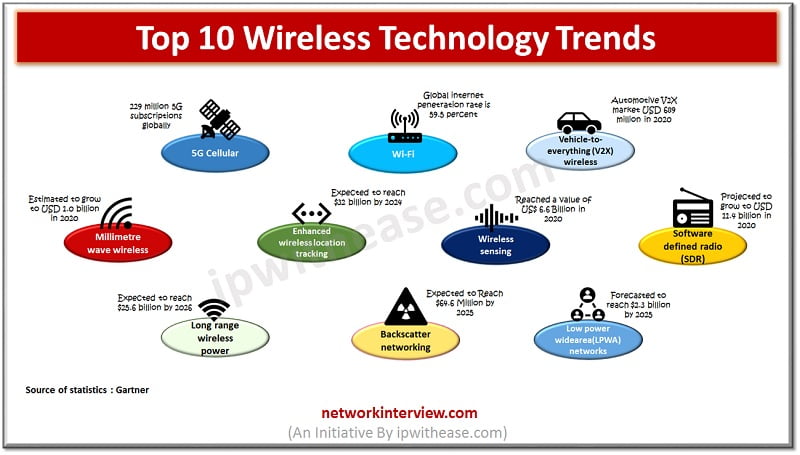
Credit: networkinterview.com

4. Wi-fi 6e And 6 Ghz Spectrum

Embracing the latest in Wi-Fi technology, Wi-Fi 6E unlocks the potential of the 6 GHz band, offering faster speeds and lower latency. This advancement ensures a more efficient and reliable wireless experience in crowded networks.

With tech giants ushering in a new era of Wi-Fi technology, Wi-Fi 6E is rapidly dominating the spotlight. This iteration operates in the untapped 6 GHz spectrum, promising superior performance. This section unpacks this game-changer.

4.1 Introduction To Wi-fi 6e

Wi-Fi 6E is the latest evolution of wireless tech. Stepping into the uncharted 6 GHz band, 6E unlocks doors to enhanced connectivity. This version is super-speedy and made for modern smart devices.

4.2 Utilizing 6 Ghz Spectrum

What’s so special about the 6 GHz spectrum? It's all about space. Think of it as a less crowded, lightning-fast freeway for your Wi-Fi traffic. Crafted for Wi-Fi 6E, this spectrum ensures smoother internet rides.

Why does the 6 GHz spectrum matter?

  • More channels: It opens 1200 MHz of space, allowing more simultaneous connections.
  • High speeds: With less interference from other devices, users enjoy fast connection speeds.
  • Low latency: Ideal for gaming or video conferencing, it offers minimal data transfer delay.

4.3 Impact On Wi-fi Performance

Wi-Fi 6E has immediate impacts on Wi-Fi performance. Expect jaws to drop, as it ushers in a new level of connectivity. Here’s a quick peek at the benefits.

What does Wi-Fi 6E bring to the table?

  1. Free-flowing Traffic: Wi-Fi 6E assures less congestion and smooth traffic flow.
  2. Fast, Wide Coverage: Brace for ultra-fast connections over a wider area.
  3. Ready for the Future: This technology is ready for next-gen tech devices.
Wi-Fi Technology Trends

 Credit: www.einfochips.com

What Is The Wi-fi Trend In 2024?

The Wi-Fi trend in 2024 emphasizes faster speeds, greater reliability, and enhanced security. Innovative technologies, like Wi-Fi 6E, are prioritized. They offer improved connectivity and broader bandwidth. The Internet of Things (IoT) integration grows stronger.

What Is The Latest Technology In Wi-fi?

Wi-Fi 6, or 802. 11ax, is the latest technology in the wireless network field. It provides faster speeds, increased capacity and better performance in challenging environments.

What Is The Next Wi-fi Technology?

The next Wi-Fi technology is Wi-Fi 7, also known as IEEE 802. 11be, which promises faster speeds and better performance in crowded networks. 

What Is The Trend In The Wi-fi Market?

The Wi-Fi market shows a trend towards faster, more secure Wi-Fi 6 and 6E technologies, driven by the increasing demand for IoT devices and smart homes.